

Table of Contents
Web Application Development
Custom web apps, portals and SaaS products
- ✔️ Discovery, UX and architecture first
- ✔️ React, Next.js and Node.js stacks
- ✔️ APIs, integrations and role-based access
- ✔️ Cloud deployment and ongoing support

You connect through a server in another country, reload a website and still see the same language, currency and offers. Before reporting a localisation bug, it is worth asking what the site uses to make those choices.
An IP address is one possible signal. A website may also use browser language, a previous preference, an account setting or a location the visitor has agreed to share. A useful localisation test separates those inputs instead of assuming that changing one should change the entire experience.
Table of Contents
Language and market are different decisions
A multilingual website offers content in more than one language. A multiregional website may also change delivery options, prices or available products according to market. These choices often overlap, but they should not be treated as interchangeable.
An English-speaking visitor in France might reasonably want English text and French delivery information. A returning customer might expect a manually chosen language to remain in place while travelling. Automatically replacing that preference whenever the network changes can make the site less useful.
Before testing, ask the product owner what is supposed to happen. Which signal sets the initial language? Does a manual choice take priority? What changes when the user signs in? A written rule gives the tester something better than personal expectation to compare against.
The browser carries information of its own
Browsers can send language preferences in an HTTP header called Accept-Language. The website may use that information when choosing a default, although it is not required to do so. It is a preference signal, not proof of the visitor’s nationality or location.
A site can also remember an earlier selection. Cookies or other supported storage may retain a language or market choice between visits. Reloading the page does not necessarily clear that state.
That explains why a returning visit and a fresh visit can behave differently on the same connection. It also explains why a private browsing window should not be described as a complete location reset: it changes some browser state, but the connection and the browser’s language preferences may still be relevant.
Use separate test cases for a first visit, a returning visit with a saved preference and a signed-in visit. Otherwise, the result may be correct for one case and misleadingly reported as wrong for another.
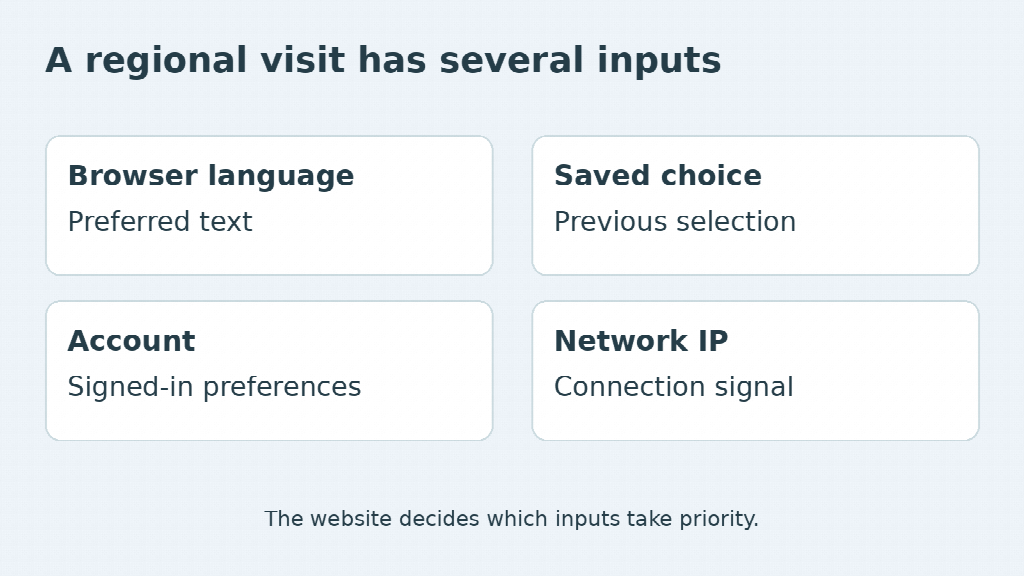
Change the network signal deliberately
A VPN can change the public exit address seen by the website, making it useful for inspecting an IP-dependent branch of the experience. It does not automatically change the browser’s language, account country or previously saved choice.
Record the exit region available in the tool and the public address used by the test request. A VPN endpoint is not a complete simulation of a resident customer’s device, payment method or delivery eligibility. Keep the claim about the test that narrow.
For a desktop workflow, aVPN for Windows may be the appropriate type of client to examine. Check its routing settings and whether the browser is included. A tool being connected does not establish that every request on the computer follows its route.
Device location is another distinct input. Web geolocation requires permission, as MDN’s documentation explains. If the site has that permission, changing an IP address need not change the location information available through the browser. Record the permission state rather than silently switching it midway through the test.
A useful bug report names the inputs
Consider a hypothetical site that promises to remember a customer’s chosen language. A tester selects English, changes the network exit region and still sees English. That result may demonstrate the intended behaviour, not a failed localisation system.
The report becomes useful when it identifies the rule, the starting conditions and the observed result. Keep the record specific:
| Input | Example of what to record |
| Browser | Version and language preferences |
| Session | Fresh, returning or signed in |
| Site choice | Language and market selected manually |
| Connection | Public exit address and region |
| Location permission | Allowed, denied or not requested |
Use a test account and approved environment when personal or commercial data is involved. Include the URL and sequence of actions so another person can reproduce the issue without guessing what the first tester had already done.
The strongest localisation checks test a decision rule. They do not merely produce a screenshot from another country and call it a customer’s experience. Once the inputs are visible, the team can decide whether the site needs fixing or the test needs a different expectation.
















Leave a Reply