

Table of Contents
RAG Development
Retrieval-Augmented Generation for grounded enterprise AI
- ✔️ Combines internal knowledge base with LLM
- ✔️ Reduces hallucinations, boosts trust
- ✔️ Powered by vector search + embeddings
- ✔️ Perfect for enterprise documentation, SOPs

Web Application Development
Custom web apps, portals and SaaS products
- ✔️ Discovery, UX and architecture first
- ✔️ React, Next.js and Node.js stacks
- ✔️ APIs, integrations and role-based access
- ✔️ Cloud deployment and ongoing support
Table of Contents
Introduction: The Shift from Task Automation to Operational Automation
For years, businesses have viewed automation as a way to eliminate repetitive tasks.
An email gets sent when a form is submitted.
A notification appears when a customer places an order.
A spreadsheet is updated when a deal moves to the next stage.
These automations certainly save time, but they only solve a small part of a much larger problem.
The real challenge facing modern organizations isn’t task execution.
It’s operational complexity.
Businesses today operate across dozens of platforms. Customer data may live in a CRM. Support requests may flow through a helpdesk. Financial information sits inside accounting systems. Internal discussions happen in Slack or Microsoft Teams. Documents are scattered across cloud storage systems. Product data exists inside multiple databases.
Every department has its own systems.
Every team has its own workflows.
Every process introduces additional coordination overhead.
As organizations grow, people spend an increasing amount of time moving information between systems, following up on approvals, generating reports, assigning work, searching for information, and manually coordinating activities that could potentially be automated.
This is where the conversation around automation is changing.
Leading organizations are no longer focused on automating individual tasks.
Instead, they are building automated operational systems.
Rather than asking:
“How can we automate this task?”
They’re asking:
“How can we automate this workflow?”
Or even:
“How can we automate this business process?”
This shift is significant.
It transforms automation from a productivity enhancement into operational infrastructure.
The result is a new generation of businesses that operate differently.
These organizations are increasingly:
- Automation-first
- Workflow-driven
- AI-assisted
- Event-based
- Operationally intelligent
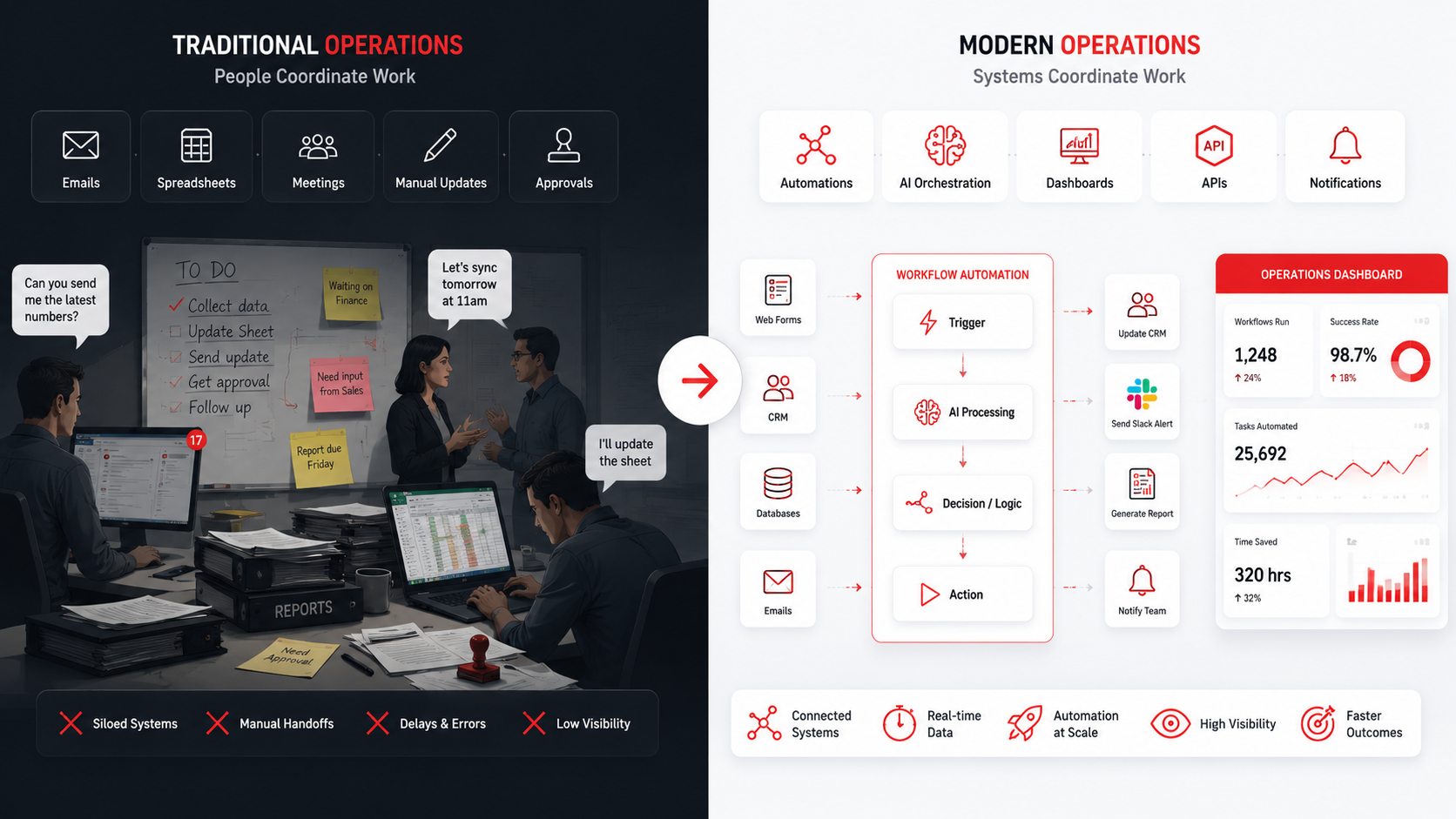
Instead of people coordinating work, systems coordinate work.
Instead of manually routing information, workflows route information.
Instead of waiting for reports, systems generate insights automatically.
Instead of reacting to operational issues, AI-enabled systems identify them proactively.
This transformation is being made possible by a rapidly evolving ecosystem of workflow automation platforms, orchestration systems, AI frameworks, and operational tooling.
Platforms such as n8n, Make, Zapier, Pipedream, Workato, OpenAI, Claude, LangGraph, and countless integrations are enabling businesses to create operational systems that would have required enterprise software teams only a few years ago.
The organizations that successfully adopt this mindset will gain a significant advantage over businesses still relying heavily on manual coordination.
Because in modern operations, speed is no longer determined by how fast people work.
It’s increasingly determined by how effectively systems work together.
Traditional Operations vs Modern Operations
Why Workflow Automation Has Become Operational Infrastructure
Many organizations still view workflow automation as a convenience.
In reality, it has become something much more important.
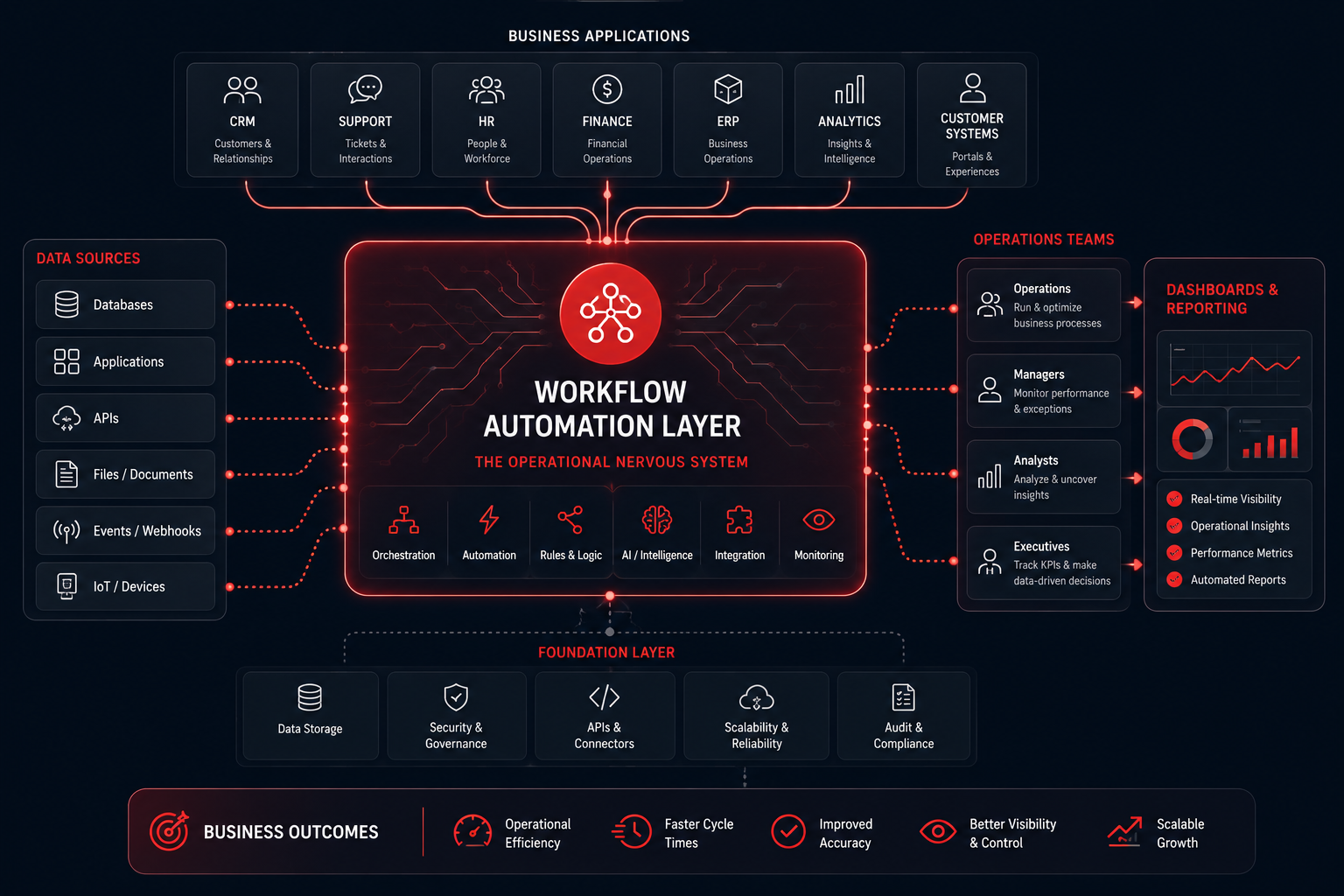
Workflow automation is increasingly becoming operational infrastructure.
To understand why, consider how business operations have evolved over the last decade.
A typical company today may use:
- CRM systems
- Helpdesk platforms
- Marketing automation tools
- Internal databases
- Analytics platforms
- Project management systems
- Communication platforms
- Document management systems
- AI tools
Every new platform creates additional operational complexity.
The problem isn’t the software itself.
The problem is the coordination between software systems.
Imagine a simple customer onboarding process.
A new customer signs a contract.
Now multiple actions need to occur:
- CRM records must be updated
- Finance teams need notification
- Project teams need assignment
- Welcome emails need sending
- Internal documentation must be created
- Support teams need visibility
- Customer success teams need alerts
None of these activities are difficult individually.
The challenge is coordinating them consistently and accurately.
Historically, businesses solved this through people.
Today, businesses increasingly solve it through workflows.
This is a fundamental shift.
Workflows have become the connective tissue between systems.
They ensure:
- Data moves automatically
- Teams stay informed
- Processes remain consistent
- Operations scale efficiently
Without workflow automation, businesses often experience:
- Process Delays
Information waits for someone to act.
- Human Error
Data gets entered incorrectly.
- Lack of Visibility
Teams don’t know what stage a process is in.
- Operational Bottlenecks
Critical activities depend on specific individuals.
Scaling Challenges
- Processes that worked for 20 employees fail at 200 employees.
- Workflow automation addresses these issues by creating operational consistency.
- Instead of relying on memory, workflows enforce process execution.
- Instead of relying on coordination, workflows orchestrate actions.
- Instead of relying on people to move information, workflows move information automatically.
- This is why workflow automation is becoming a foundational component of modern operational architecture.
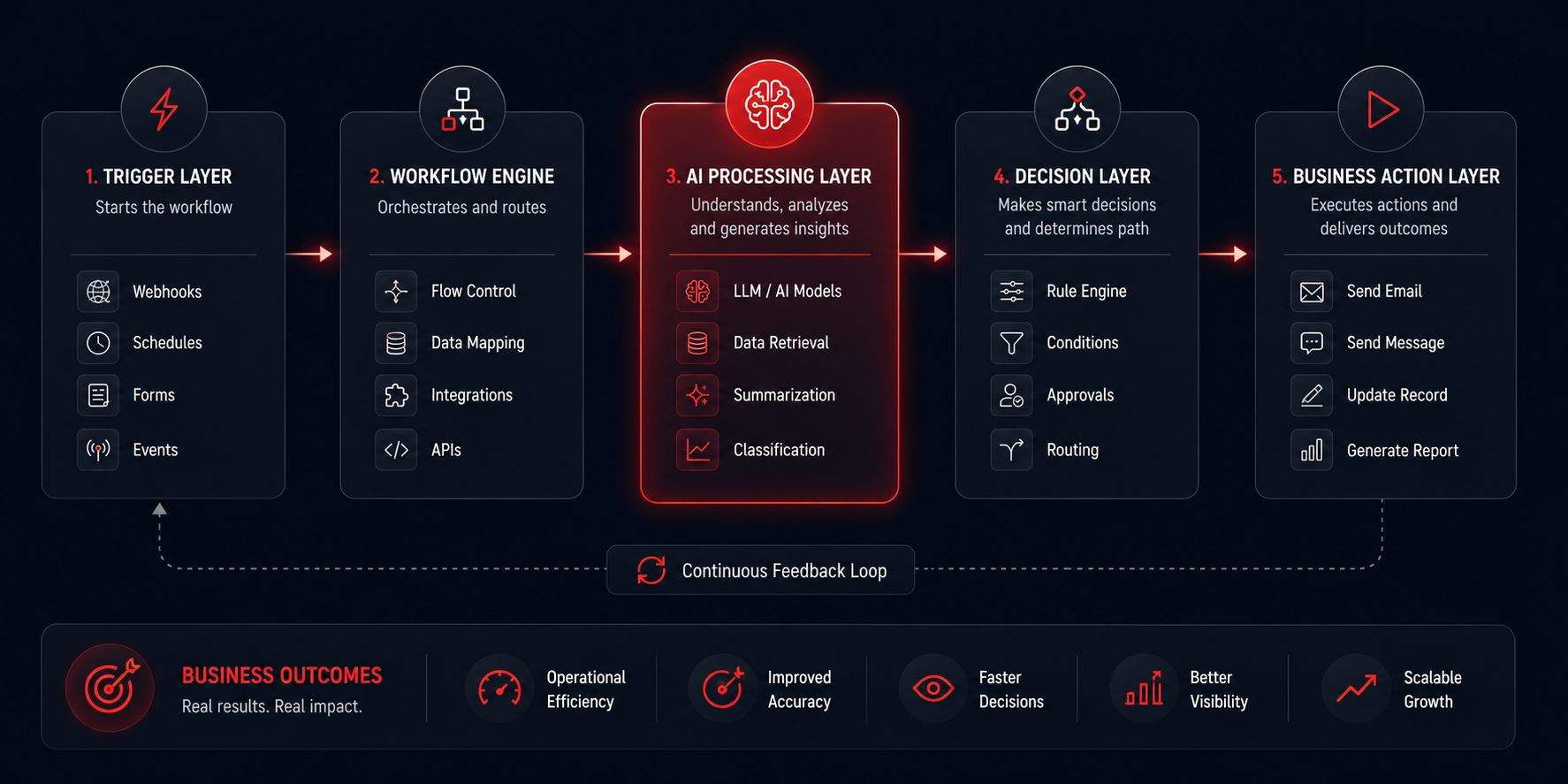
Anatomy of a Modern AI Workflow
- One of the biggest misconceptions about automation is that workflows are simply “if this, then that” rules.
- Modern workflows are far more sophisticated.
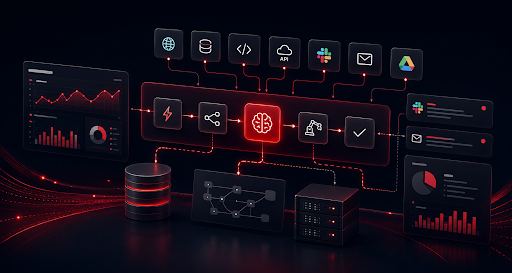
- The most effective operational systems are built using multiple layers.
- Each layer performs a distinct role.
- Together, these layers create intelligent business processes.
- Let’s examine the architecture of a modern AI-enabled workflow.
Layer 1: Trigger Layer
Every workflow begins with an event.
Examples include:
- Form submissions
- Support tickets
- Purchase orders
- Contract approvals
- Customer inquiries
- Database updates
- Calendar events
- Emails received
These events act as workflow triggers.
The trigger initiates everything that follows.
For example:
- A support ticket arrives.
- A lead submits a form.
- A purchase request is created.
- The workflow engine detects the event and begins execution.
- Without triggers, automation cannot occur.
- This layer serves as the entry point for operational workflows.
Layer 2: Workflow Orchestration Layer
This is where workflow automation platforms operate.
Platforms such as:
- n8n
- Make
- Zapier
- Pipedream
- Workato
manage workflow execution.
Their responsibilities include:
- Routing data
- Executing logic
- Managing integrations
- Coordinating actions
- Handling conditions
- Triggering downstream systems
Think of this layer as the conductor of an orchestra.
The conductor doesn’t play every instrument.
The conductor coordinates them.
Workflow engines perform a similar role.
They coordinate business systems.
This orchestration layer is often the most important component of modern operational infrastructure.
Layer 3: Intelligence Layer
- This is where AI enters the picture.
- Traditional automation follows predefined rules.
- AI-enabled automation introduces decision-making capabilities.
Examples include:
- Ticket Classification
AI determines issue category and priority.
- Lead Qualification
AI evaluates lead quality.
- Content Summarization
AI generates concise operational summaries.
- Knowledge Retrieval
AI searches internal documentation.
- Report Generation
AI transforms data into business insights.
- Approval Recommendations
AI evaluates requests against business policies.
This layer dramatically expands what workflows can accomplish.
Instead of merely moving information, workflows can now interpret information.
That distinction changes everything.
Layer 4: Decision Layer
Not every workflow should be fully automated.
Some actions require:
- Human approval
- Risk assessment
- Compliance review
- Escalation
The decision layer determines:
- Whether automation should continue
- Whether a human should intervene
- Whether additional information is required
This creates an important concept known as:
- Human-in-the-Loop Automation
- The most effective operational systems combine automation with human oversight.
- Automation accelerates execution.
- Humans provide judgment.
- The combination produces better outcomes than either approach independently.
Layer 5: Action Layer
This is where business value is created.
Actions may include:
- Updating a CRM
- Sending notifications
- Creating support tickets
- Assigning tasks
- Generating reports
- Triggering approvals
- Updating databases
- Executing API calls
The workflow ultimately exists to drive business actions.
Without actions, automation becomes an interesting technical exercise rather than an operational asset.
Why AI Changes Workflow Automation
For many years, workflow automation platforms focused primarily on moving information between systems.
- An event occurred.
- A workflow executed.
- A predefined action followed.
- The process was deterministic.
- AI introduces a new dimension.
Workflows can now:
- Understand context
- Analyze documents
- Extract insights
- Generate recommendations
- Classify information
- Search knowledge bases
- Assist decision-making
This significantly expands the role automation can play inside organizations.
For example, consider a support ticket workflow.
Traditional automation might:
- Assign the ticket
- Notify an agent
- Update the CRM
AI-enabled automation can additionally:
- Analyze customer sentiment
- Determine urgency
- Retrieve relevant documentation
- Recommend responses
- Escalate high-risk cases
The workflow becomes more than a routing mechanism.
It becomes an operational intelligence system.
This shift explains why businesses are increasingly investing in AI-enabled workflow platforms rather than traditional automation alone.
The goal is no longer simply to automate actions.
The goal is to automate operational decision-making wherever appropriate.
What Makes a Good Automation Candidate?
- One of the biggest mistakes organizations make is attempting to automate everything.
- Not every process should be automated.
- The best automation opportunities typically share several characteristics.
- High Volume
The process occurs frequently.
- Repeatability
The process follows consistent patterns.
- Clear Inputs
Required information is structured and predictable.
- Defined Outcomes
The desired result is known.
- Operational Impact
The process consumes meaningful time or resources.
Examples include:
- Lead routing
- Support triage
- Reporting
- Approvals
- Data synchronization
- Document processing
- Employee onboarding
- Customer onboarding
These processes often produce immediate operational benefits when automated.
By contrast, highly creative, highly variable, or highly strategic activities typically benefit from assistance rather than full automation.
Understanding this distinction is critical when designing AI-enabled workflows.
Automation should reduce operational friction.
It should not introduce unnecessary complexity.
Preparing for the Right Automation Platform
Before selecting tools such as n8n, Make, Zapier, Pipedream, or Workato, organizations should first answer three questions:
What process are we trying to improve?
What systems need to communicate?
Where can AI create operational value?
Businesses that answer these questions first tend to build far more effective automation systems than those that begin with tool selection.
Technology should support operational strategy.
Not the other way around.
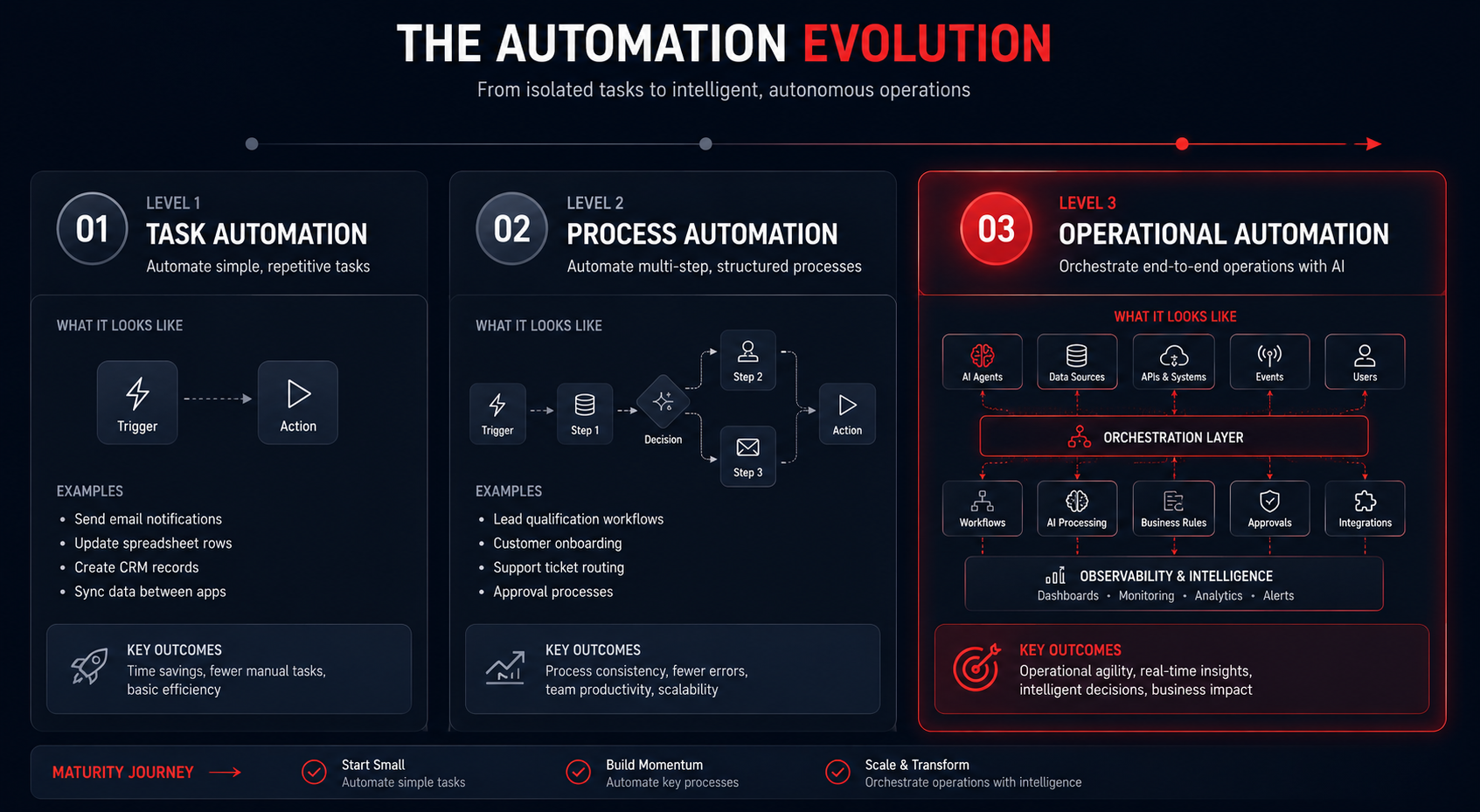
Before Choosing a Platform: Understand the Three Automation Maturity Levels
- One of the most common mistakes businesses make is selecting a tool before understanding their operational maturity.
- Automation platforms are not interchangeable.
- The right platform for a 20-person startup may be completely wrong for a 2,000-person enterprise.
- Most organizations typically move through three stages.
Level 1: Task Automation
Examples:
- Send notifications
- Update spreadsheets
- Create CRM records
- Sync contacts
Characteristics:
- Simple workflows
- Minimal branching logic
- Limited AI usage
- Few integrations
Common tools:
- Zapier
- Make
Level 2: Process Automation
Examples:
- Lead qualification
- Customer onboarding
- Support ticket routing
- Approval workflows
Characteristics:
- Multiple systems involved
- Conditional logic
- Workflow orchestration
- AI-assisted decisions
Common tools:
- Make
- n8n
- Pipedream
Level 3: Operational Automation
Examples:
- AI support operations
- Automated reporting systems
- AI approval systems
- Internal operations orchestration
Characteristics:
- Cross-functional workflows
- AI decision layers
- Human-in-the-loop processes
- Operational governance
Common tools:
- n8n
- Workato
- LangGraph
- Enterprise orchestration platforms
n8n: The Modern Workflow Engine for AI-Enabled Operations
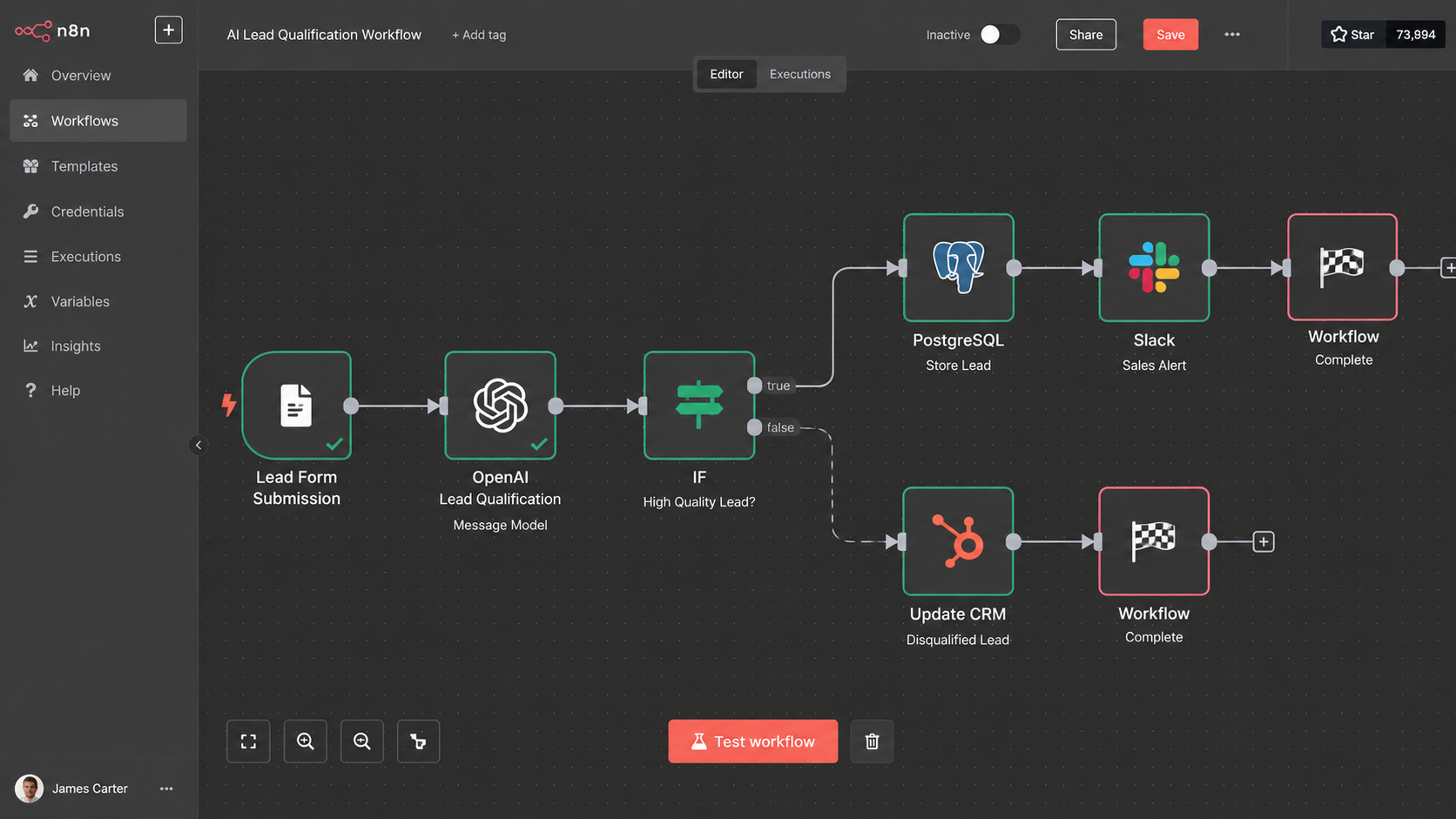
Over the last few years, n8n has emerged as one of the most important workflow automation platforms in the modern operations stack.
While many automation tools focus primarily on connecting applications, n8n increasingly acts as an orchestration layer for entire business operations.
This distinction is important.
Businesses are no longer using n8n simply to automate tasks.
They are using it to automate operational workflows.
Why Operations Teams Like n8n
n8n offers a balance that few platforms achieve:
- Visual workflow design
- Technical flexibility
- AI integrations
- Self-hosting capabilities
- API orchestration
- Complex logic support
This makes it attractive to both operations teams and engineering teams.
Unlike traditional automation platforms, n8n handles complex business logic extremely well.
Examples include:
- Multi-step approvals
- AI-powered document processing
- Lead enrichment systems
- Support ticket routing
- Operational reporting
- Workflow orchestration
Where n8n Excels
AI Workflow Automation
n8n has rapidly become a favorite among teams building AI-powered workflows.
Businesses frequently use it to:
- Classify tickets
- Summarize reports
- Analyze documents
- Route requests
- Generate operational insights
Self-Hosted Operations
Organizations with governance requirements often prefer self-hosting.
This provides:
- Greater control
- Internal data management
- Infrastructure ownership
- Security flexibility
Complex Workflow Orchestration
As workflows become more sophisticated, n8n’s flexibility becomes increasingly valuable.
When n8n May Not Be Ideal
n8n is not always the best choice.
Smaller teams may find:
- Setup complexity higher
- Learning curve steeper
- Governance requirements unnecessary
For simple automations, lighter platforms may be more appropriate.
Make: Visual Workflow Automation at Scale
Make occupies a unique position within the automation landscape.
It combines accessibility with surprisingly sophisticated workflow capabilities.
For many operations teams, Make serves as an ideal bridge between basic automation and advanced orchestration.
Why Businesses Choose Make
Make provides:
- Visual workflow building
- Low-code implementation
- Strong SaaS integrations
- Rapid deployment
- Operational flexibility
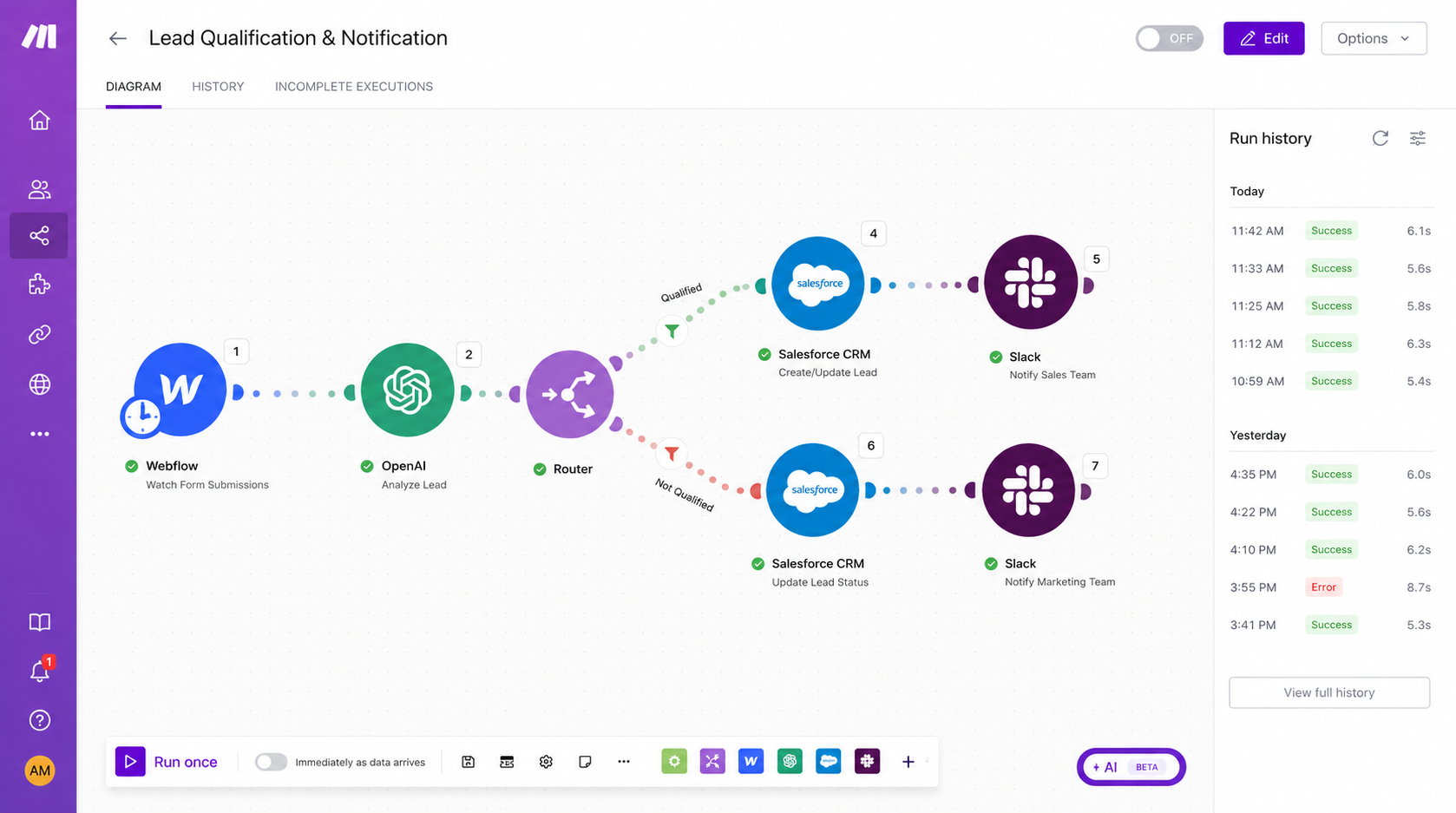
Its scenario builder remains one of the most intuitive automation interfaces available today.
This makes it especially attractive for operations leaders who need automation without extensive engineering involvement.
Common Business Use Cases
Organizations frequently use Make for:
Customer Onboarding
Automating:
- Welcome emails
- CRM updates
- Team notifications
- Project creation
Operational Reporting
Automating:
- Data aggregation
- Report generation
- Team notifications
Internal Approvals
Automating:
- Request routing
- Escalation logic
- Approval workflows
Where Make Shines
Make works particularly well when:
- Speed matters
- Teams prefer visual builders
- Workflows are moderately complex
- Engineering resources are limited
Limitations
As operational complexity grows, some organizations begin encountering limitations related to:
- Workflow governance
- Large-scale orchestration
- Advanced AI workflows
- Enterprise operational management
At that point, platforms like n8n or Workato often become stronger candidates.
Zapier: The Entry Point Into Workflow Automation
- Zapier played a major role in introducing automation to mainstream business users.
- For many organizations, Zapier remains the first automation platform they adopt.
- And in many cases, it remains the correct choice.
Why Zapier Continues to Matter
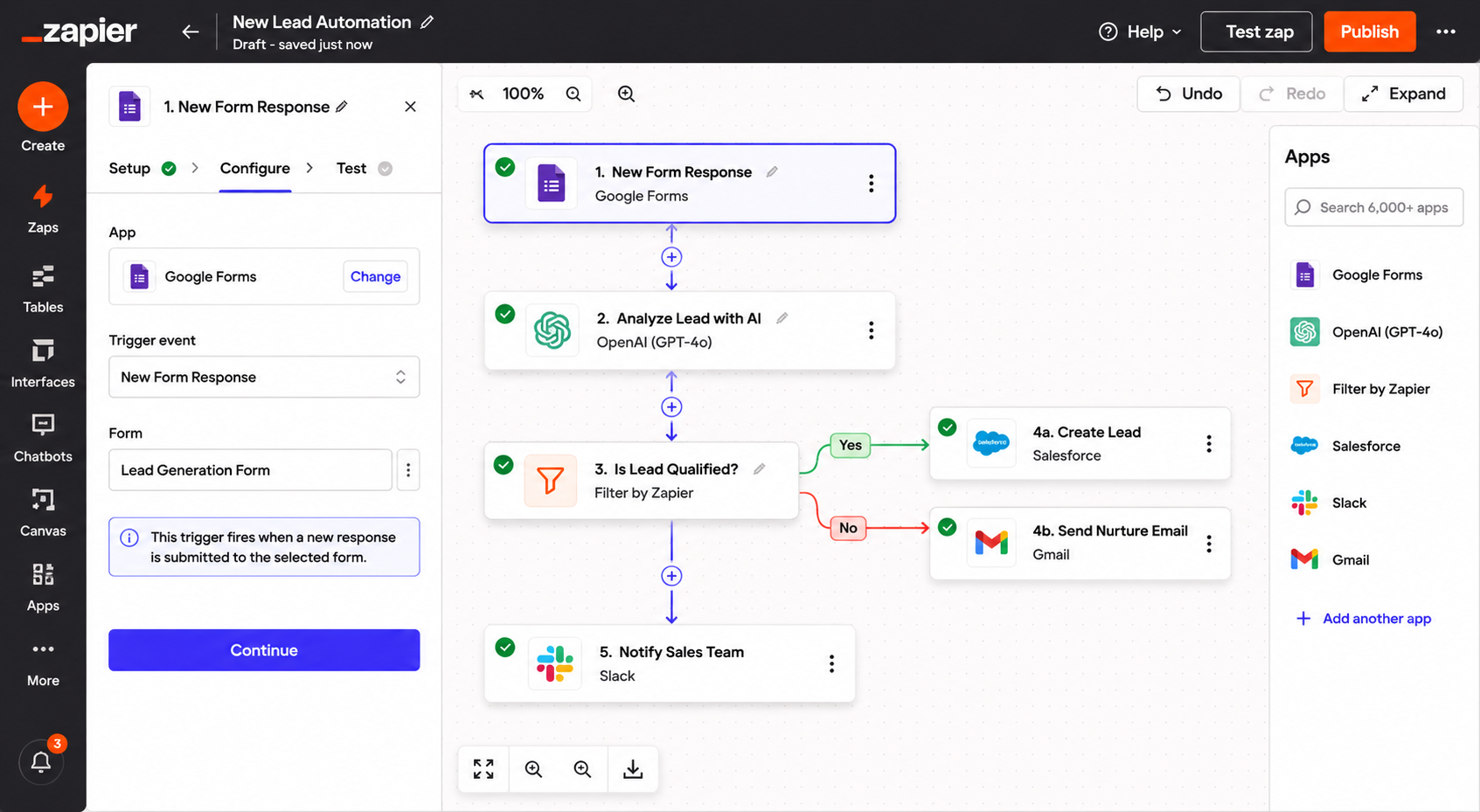
- Zapier’s greatest strength is simplicity.
- Most workflows can be created without technical expertise.
- This enables rapid adoption across teams.
Ideal Use Cases
Zapier excels at:
- Notifications
- CRM updates
- Marketing automations
- Form processing
- SaaS integrations
Examples include:
- Lead routing
- Email automation
- Contact synchronization
- Calendar updates
Where Zapier Falls Short
As businesses move toward operational automation, they often encounter limitations.
Examples include:
- Complex branching
- Large workflows
- AI orchestration
- Advanced governance
- Enterprise coordination
Zapier is excellent for task automation.
It is less suited for large-scale operational orchestration.
Pipedream: Workflow Automation for Technical Teams
Pipedream occupies an interesting position between traditional automation tools and custom development.
It appeals strongly to organizations that want flexibility without building everything from scratch.
What Makes Pipedream Different
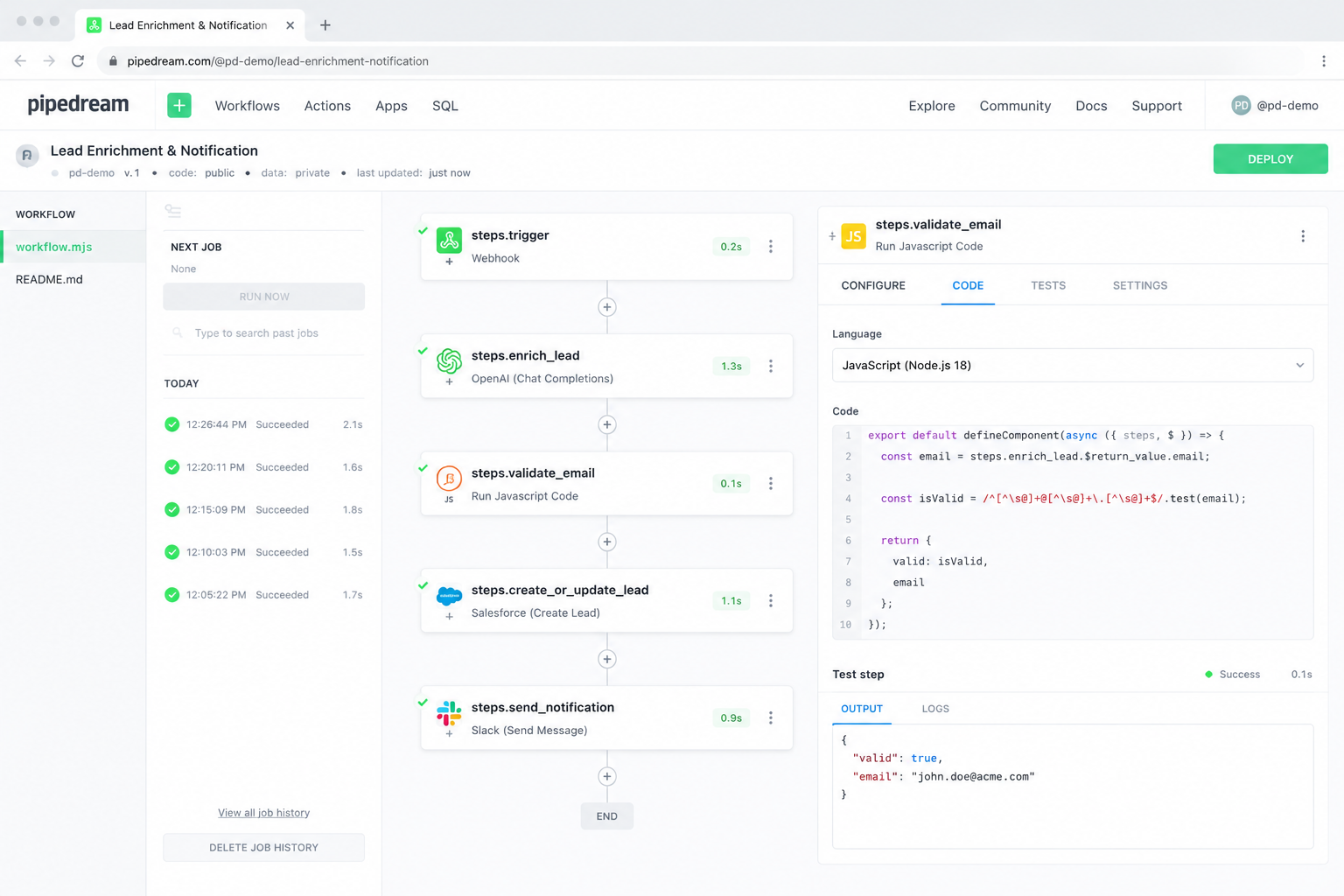
Unlike traditional low-code automation platforms, Pipedream gives teams much greater control over:
- Code execution
- APIs
- Integrations
- Workflow logic
This makes it particularly attractive for product teams and technical operations groups.
Common Use Cases
Pipedream frequently appears in:
Product Operations
Automating:
- Product analytics
- User lifecycle events
- Customer activity processing
API Orchestration
Managing:
- Data pipelines
- Internal APIs
- Event processing
AI Integrations
Connecting:
- LLMs
- Databases
- Operational systems
When Pipedream Is a Strong Choice
Organizations often choose Pipedream when:
- Developers are involved
- API-heavy workflows exist
- Product systems require orchestration
- Technical flexibility is important
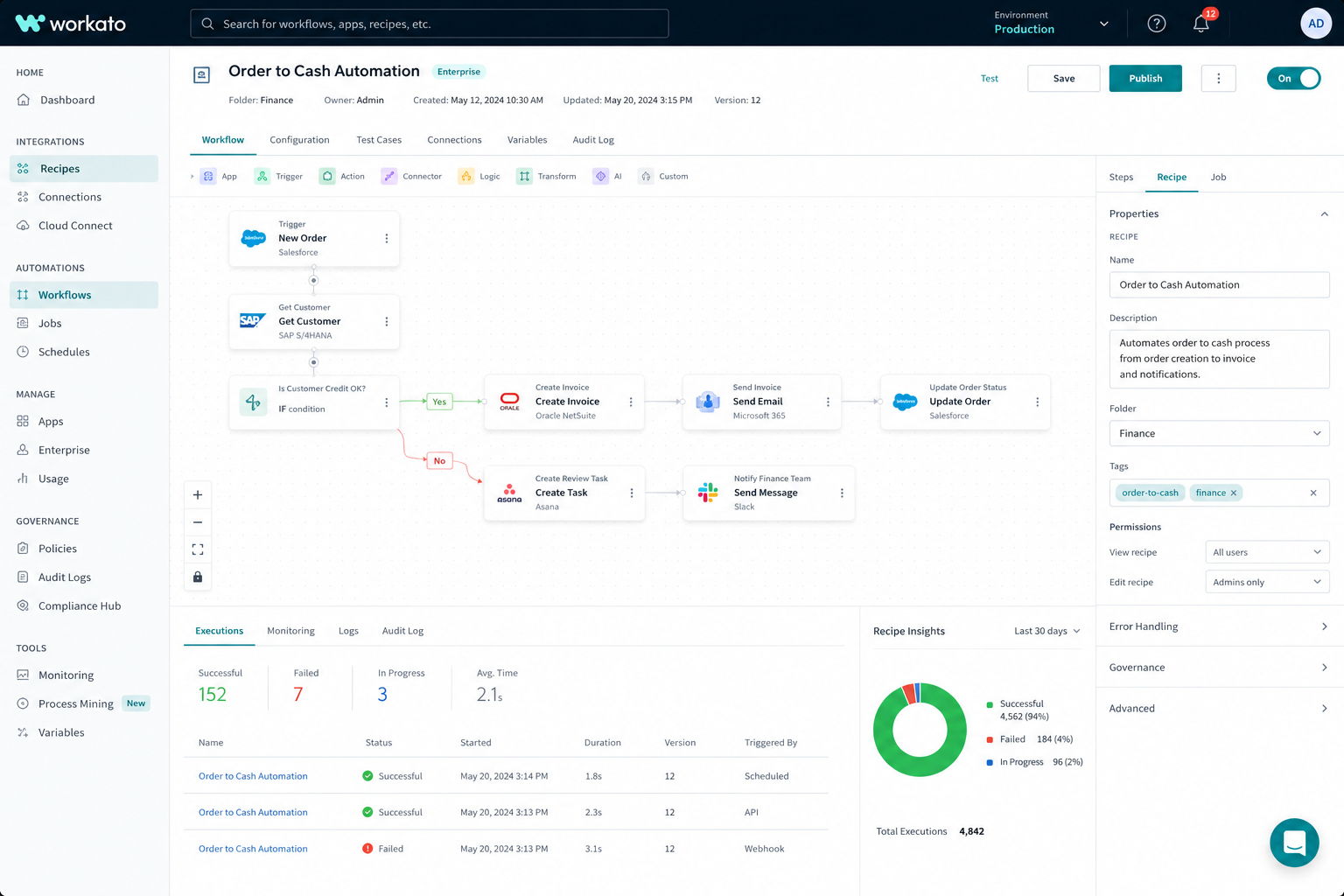
Workato: Enterprise Workflow Automation
While platforms like Zapier and Make often dominate discussions, Workato remains one of the most important automation platforms within larger enterprises.
Its focus is operational governance and enterprise-scale automation.
Why Enterprises Adopt Workato
Large organizations often require:
- Workflow governance
- Compliance controls
- Security oversight
- Operational monitoring
- Large-scale integrations
Workato addresses these needs exceptionally well.
Employee Onboarding
Automating:
- Account provisioning
- Approvals
- Notifications
- Access management
Finance Operations
Automating:
- Invoice processing
- Approvals
- Reconciliation workflows
Enterprise Reporting
Automating:
- Data collection
- Reporting workflows
- Executive dashboards
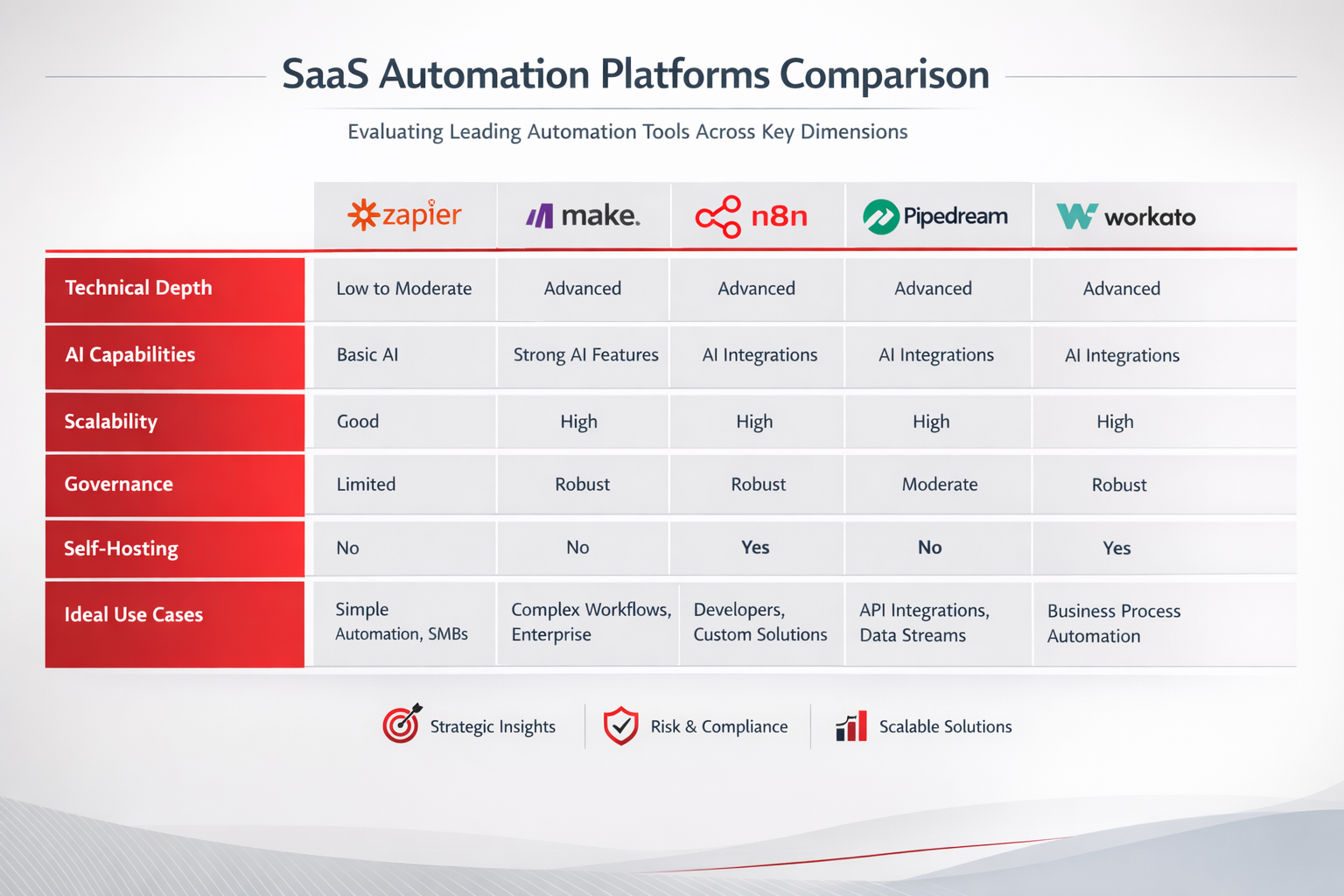
Workflow Platform Comparison
Choosing the right platform depends less on features and more on operational goals.
The following framework provides a practical starting point.
| Platform | Best For | Technical Depth | AI Workflows | Self Hosted | Operational Scale |
| Zapier | Task Automation | Low | Basic | No | Small-Medium |
| Make | Process Automation | Medium | Good | No | Medium |
| n8n | Operational Automation | High | Excellent | Yes | High |
| Pipedream | Developer Workflows | High | Strong | Limited | High |
| Workato | Enterprise Operations | High | Strong | No | Enterprise |
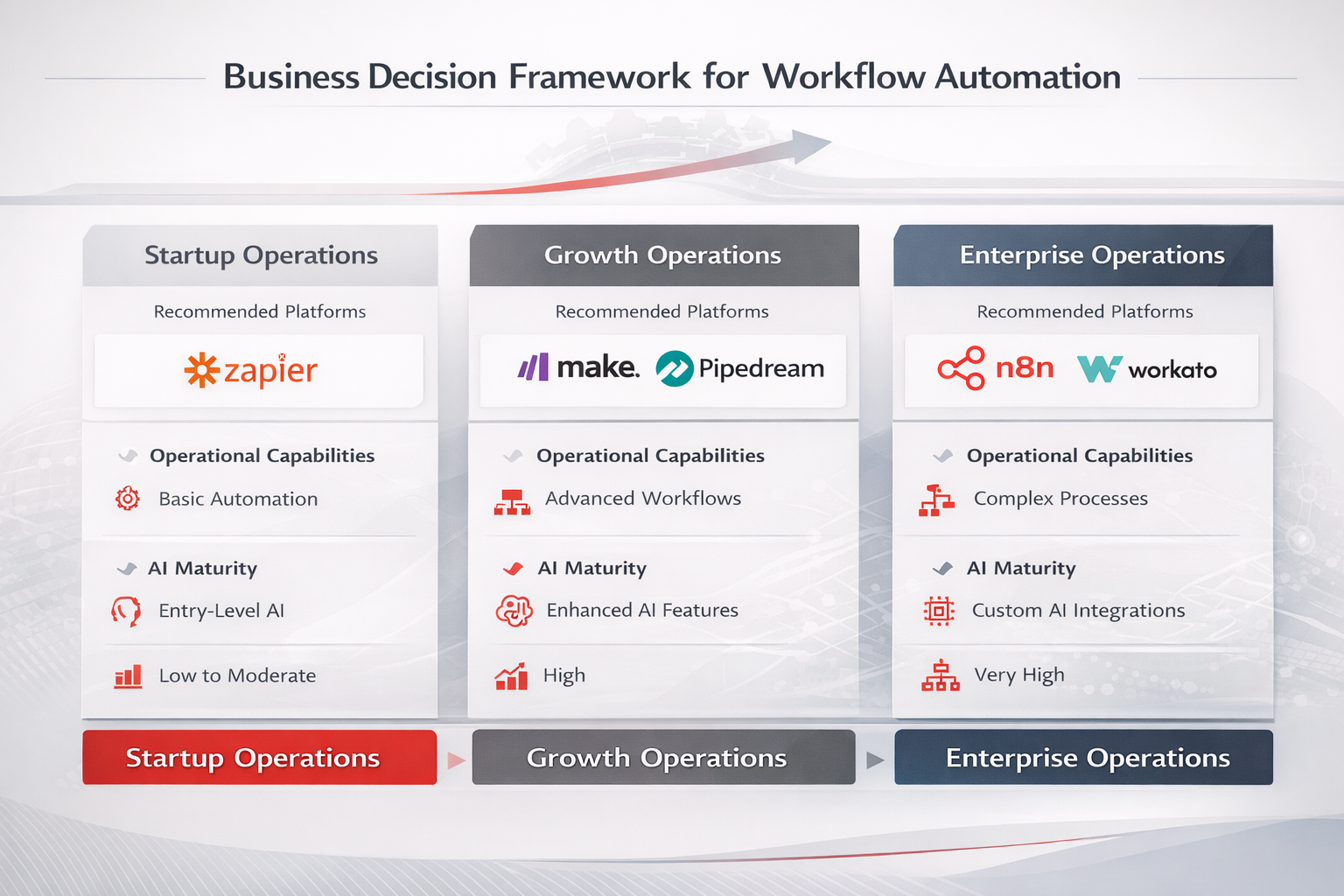
Choosing the Right Platform
Many businesses ask:
Which workflow automation platform is best?
The reality is that the answer depends entirely on operational requirements.
A better question is:
Which platform best supports our operational architecture?
For example:
Startup Operations
Recommended Stack:
- Airtable
- Make
- Slack
Focus:
- Rapid deployment
- Minimal complexity
- Fast automation
Growth Operations
Recommended Stack:
- Supabase
- n8n
- Slack
- OpenAI
Focus:
- Workflow orchestration
- AI integration
- Operational scalability
Enterprise Operations
Recommended Stack:
- PostgreSQL
- Workato
- Internal dashboards
- AI orchestration layer
Focus:
- Governance
- Reliability
- Compliance
- Enterprise coordination
AI Workflow Automation in the Real World
The most successful workflow automation initiatives usually begin with operational bottlenecks.
Not technology.
The process typically looks like this:
- Identify operational friction
- Map the workflow
- Identify decision points
- Introduce automation
- Introduce AI where judgment is required
- Retain human oversight where necessary
The result is not a collection of disconnected automations.
The result is an operational system.
Let’s examine some practical examples.
Workflow Example #1: AI Lead Qualification System
Lead management is one of the most common automation opportunities.
Many businesses still rely on sales teams to manually:
- Review incoming leads
- Assess quality
- Assign priorities
- Route opportunities
- Schedule follow-ups
At low volume this works.
At scale it becomes a bottleneck.
Modern organizations increasingly automate large portions of this process.
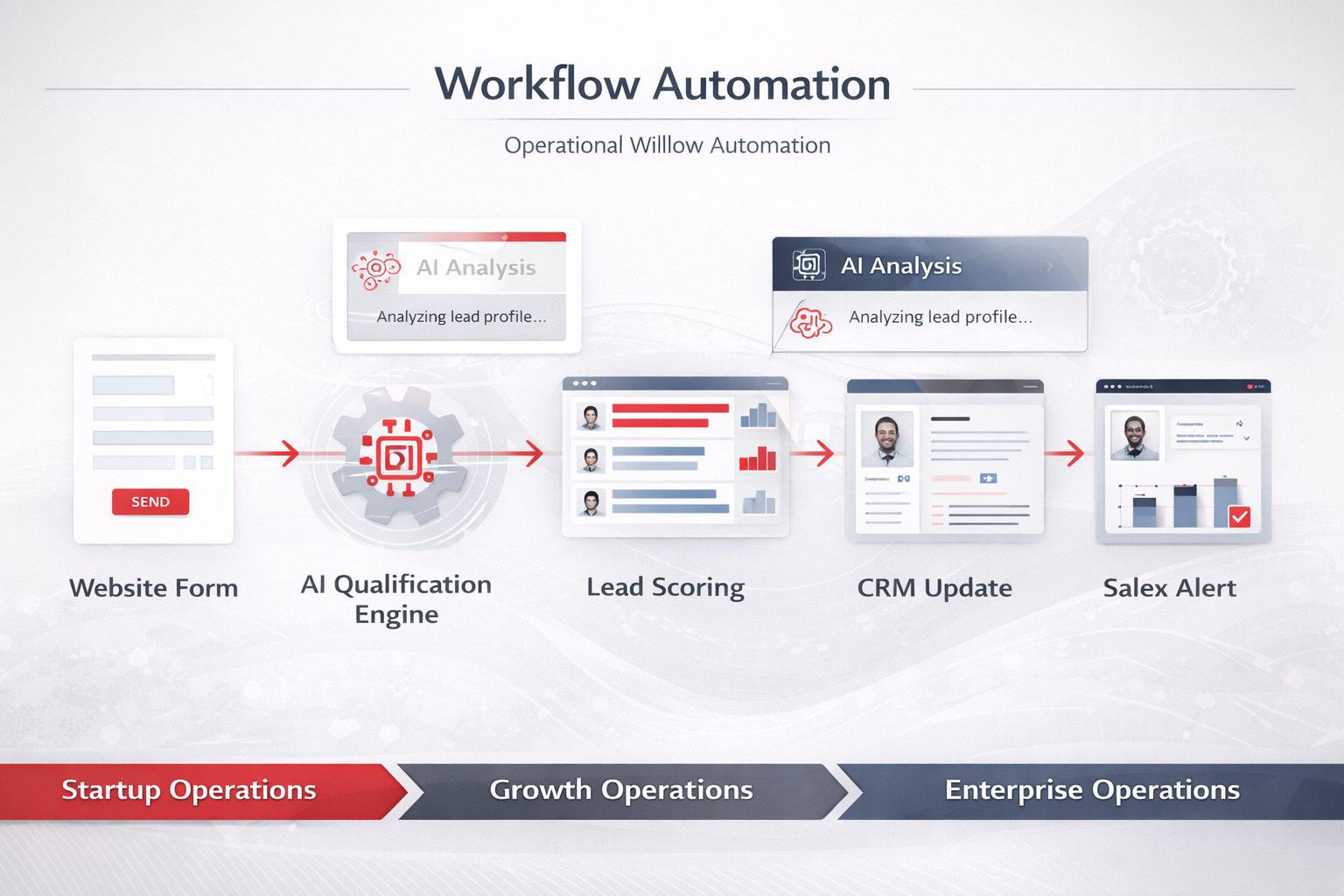
The AI layer may evaluate:
- Company size
- Industry
- Intent signals
- Geographic location
- Budget indicators
- Previous interactions
Instead of every lead receiving identical treatment, workflows automatically prioritize opportunities.
Benefits include:
- Faster response times
- Improved lead routing
- Better sales efficiency
- Higher conversion potential
Workflow Example #2: AI Support Ticket Routing
Customer support operations are increasingly becoming automation-driven.
Support teams often face challenges such as:
- Ticket overload
- Misrouted requests
- Delayed responses
- Inconsistent prioritization
AI workflow automation can dramatically improve these processes.
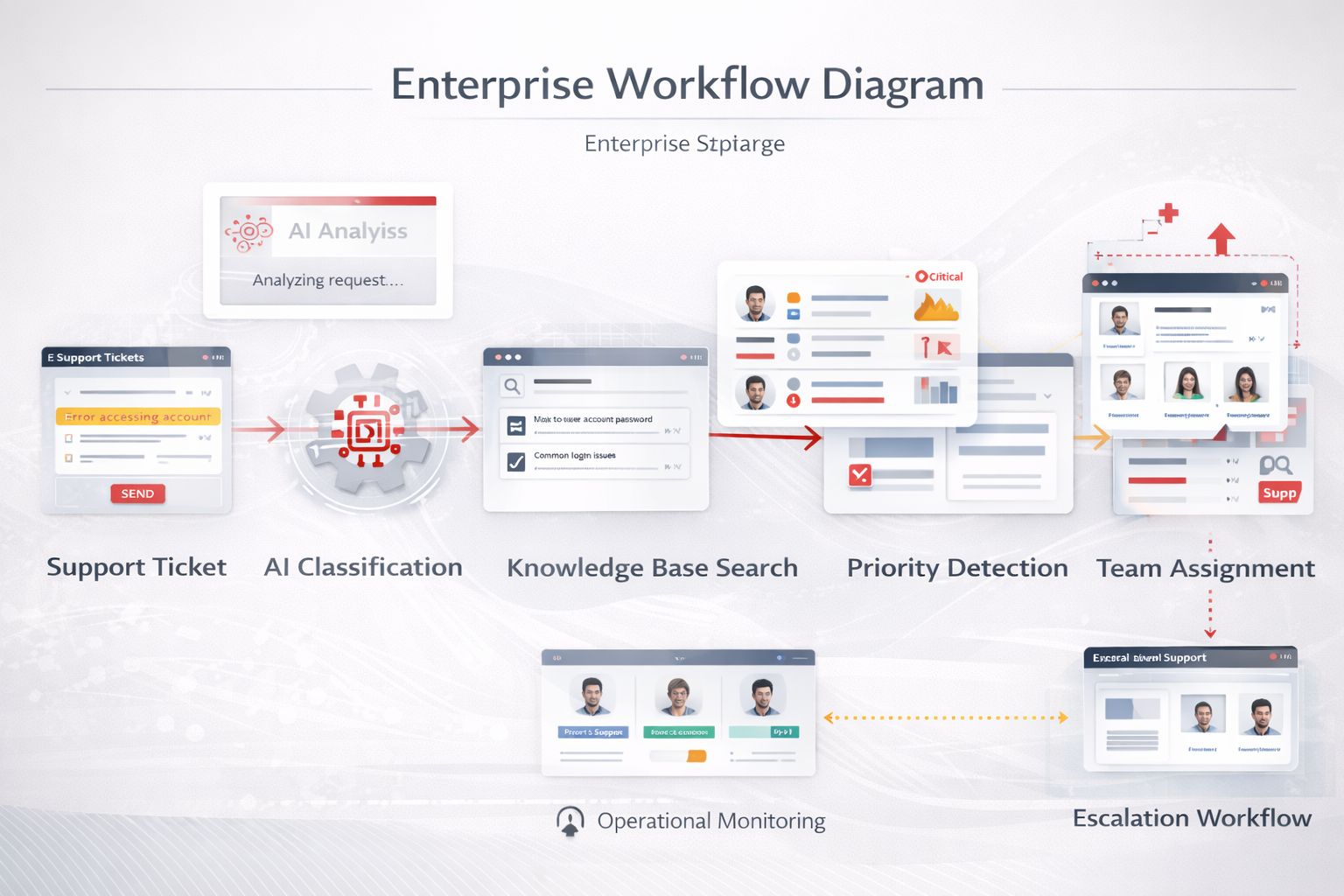
The AI layer may determine:
- Ticket category
- Urgency level
- Customer sentiment
- Required expertise
- Escalation likelihood
The workflow engine then routes requests appropriately.
Benefits include:
- Reduced response times
- Better ticket distribution
- Increased consistency
- Improved customer experience
Workflow Example #3: AI Reporting Automation
Reporting remains one of the most time-consuming operational activities inside many organizations.
Teams frequently spend hours:
- Exporting data
- Consolidating spreadsheets
- Creating summaries
- Building presentations
- Communicating insights
Many of these activities can now be automated.
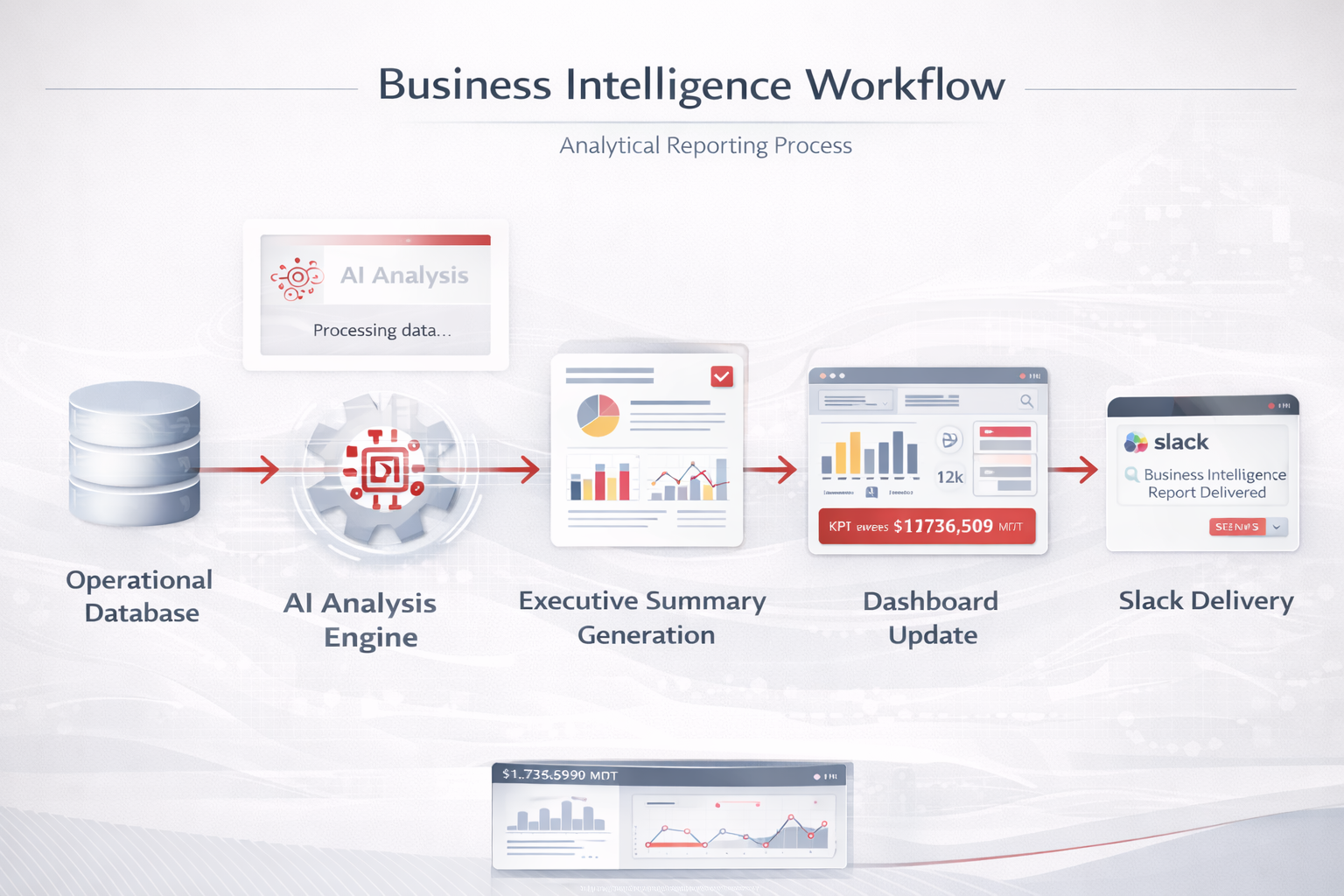
Instead of manually producing reports, teams receive:
- Automated summaries
- Trend analysis
- Operational insights
- Exception alerts
Benefits include:
- Faster decision-making
- Improved visibility
- Reduced reporting overhead
- More consistent communication
Workflow Example #4: AI Approval Systems
Approvals are often among the most inefficient operational processes.
Many organizations still manage approvals through:
- Email chains
- Chat messages
- Spreadsheets
- Informal communication
These approaches create delays and reduce visibility.
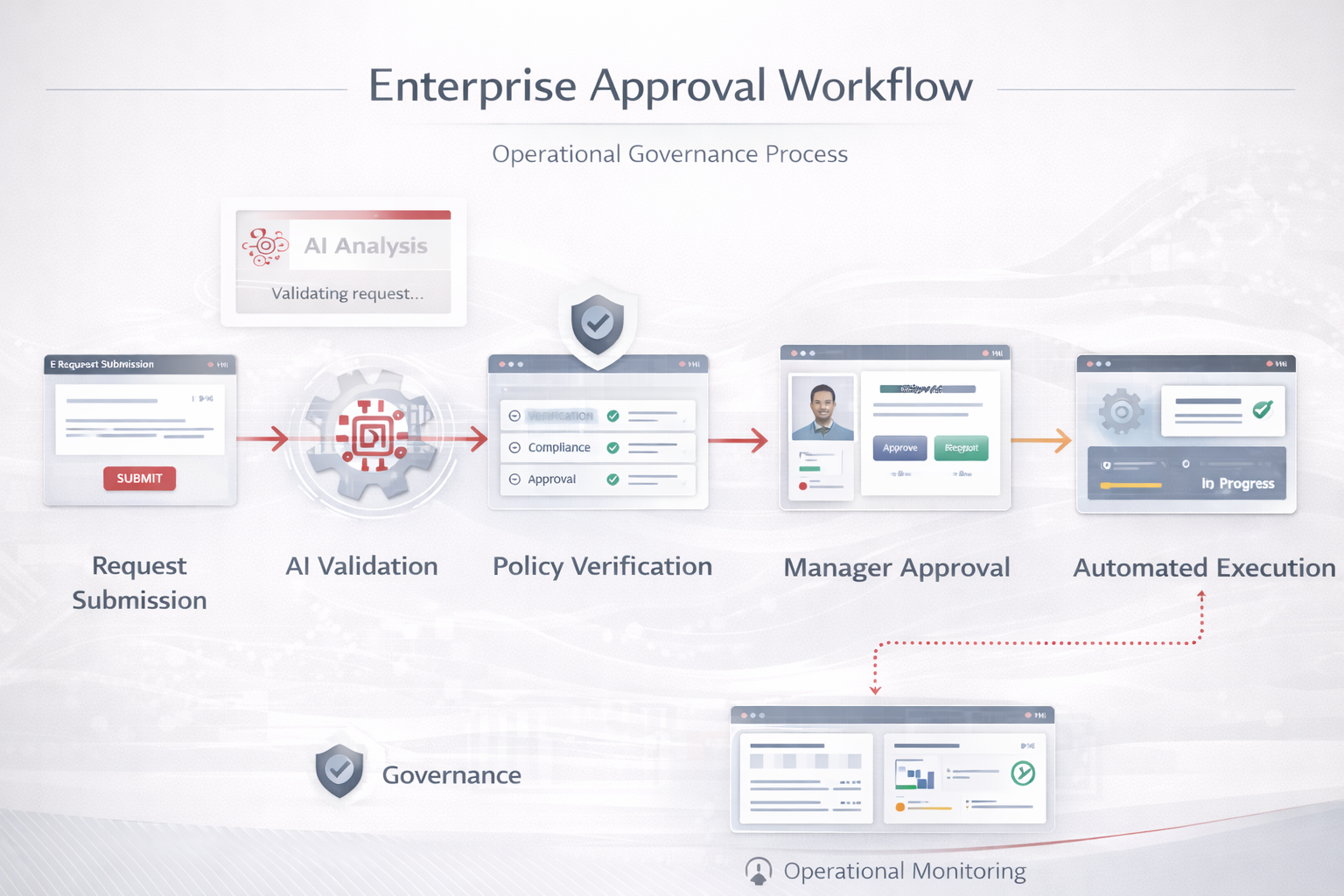
AI may evaluate:
- Policy compliance
- Missing information
- Risk indicators
- Historical patterns
Benefits include:
- Faster approvals
- Better governance
- Improved visibility
- Reduced manual coordination
AI Agents vs Traditional Automation
As organizations become more sophisticated, a new concept begins appearing within operational systems:
- AI agents.
- Unfortunately, the term is often misunderstood.
- Many people assume AI agents are simply advanced chatbots.
- They’re not.
- Traditional automation and AI agents solve different problems.
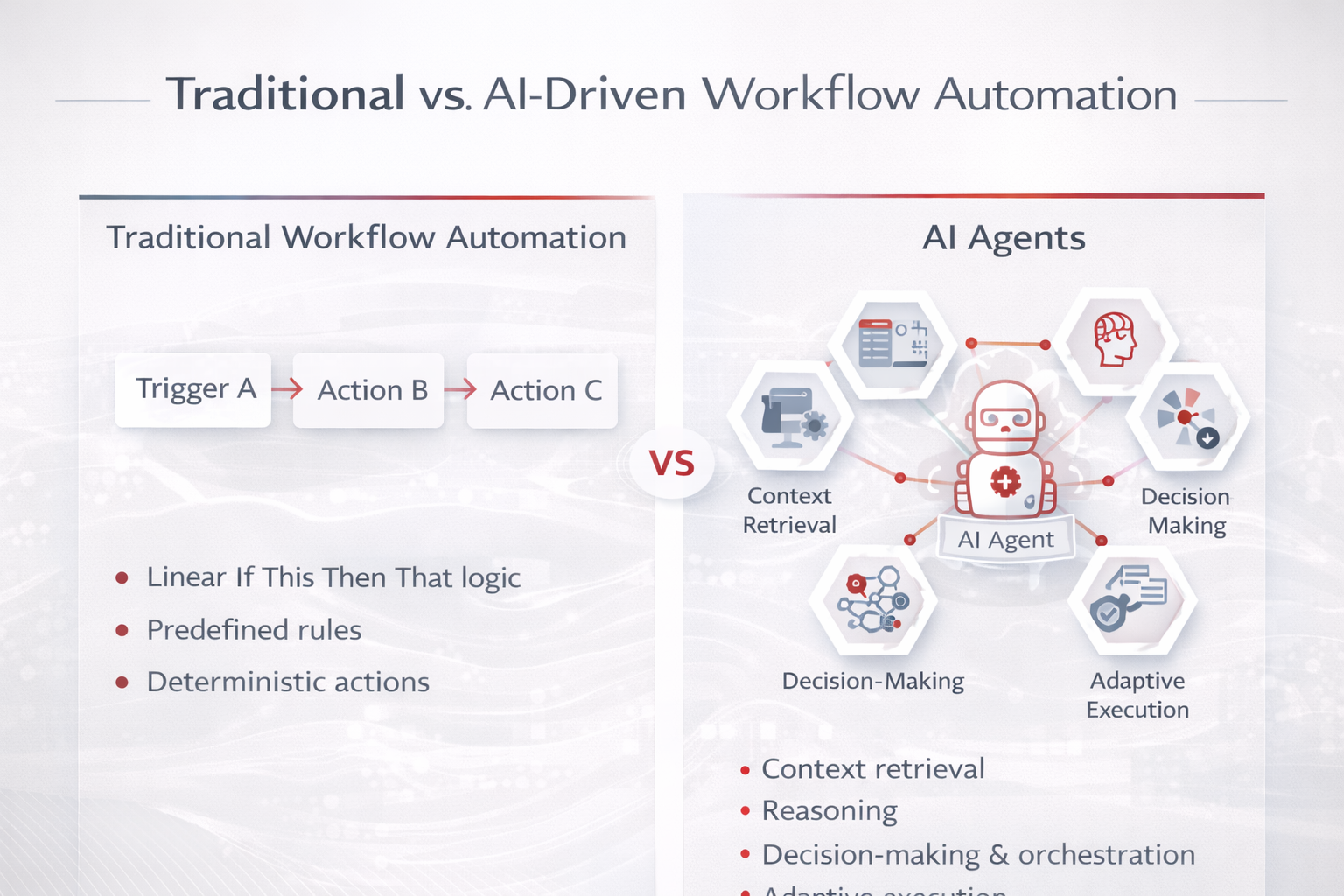
Traditional Automation
Traditional workflows operate using predefined rules.
Example:
If Form Submitted
↓
Create CRM Record
↓
Send Notification
The workflow follows explicit instructions.
It does not reason.
It executes.
This approach works extremely well for structured business processes.
AI Agents
AI agents introduce a new capability.
They can:
- Understand context
- Retrieve information
- Evaluate options
- Determine actions
- Execute workflows
Example:
Customer Request
↓
Context Retrieval
↓
AI Evaluation
↓
Decision Selection
↓
Workflow Execution
The distinction is important.
Traditional automation follows instructions.
AI agents participate in decision-making.
Where AI Agents Create Operational Value
AI agents are increasingly being used for:
- Operational Research
Gathering and summarizing information.
- Knowledge Retrieval
Finding relevant internal documentation.
- Support Assistance
Helping support teams resolve issues.
- Workflow Coordination
Managing multi-step processes.
- Operational Reporting
Analyzing data and generating insights.
- Internal Copilots
Assisting employees with operational tasks.
These capabilities make AI agents a natural extension of workflow automation.
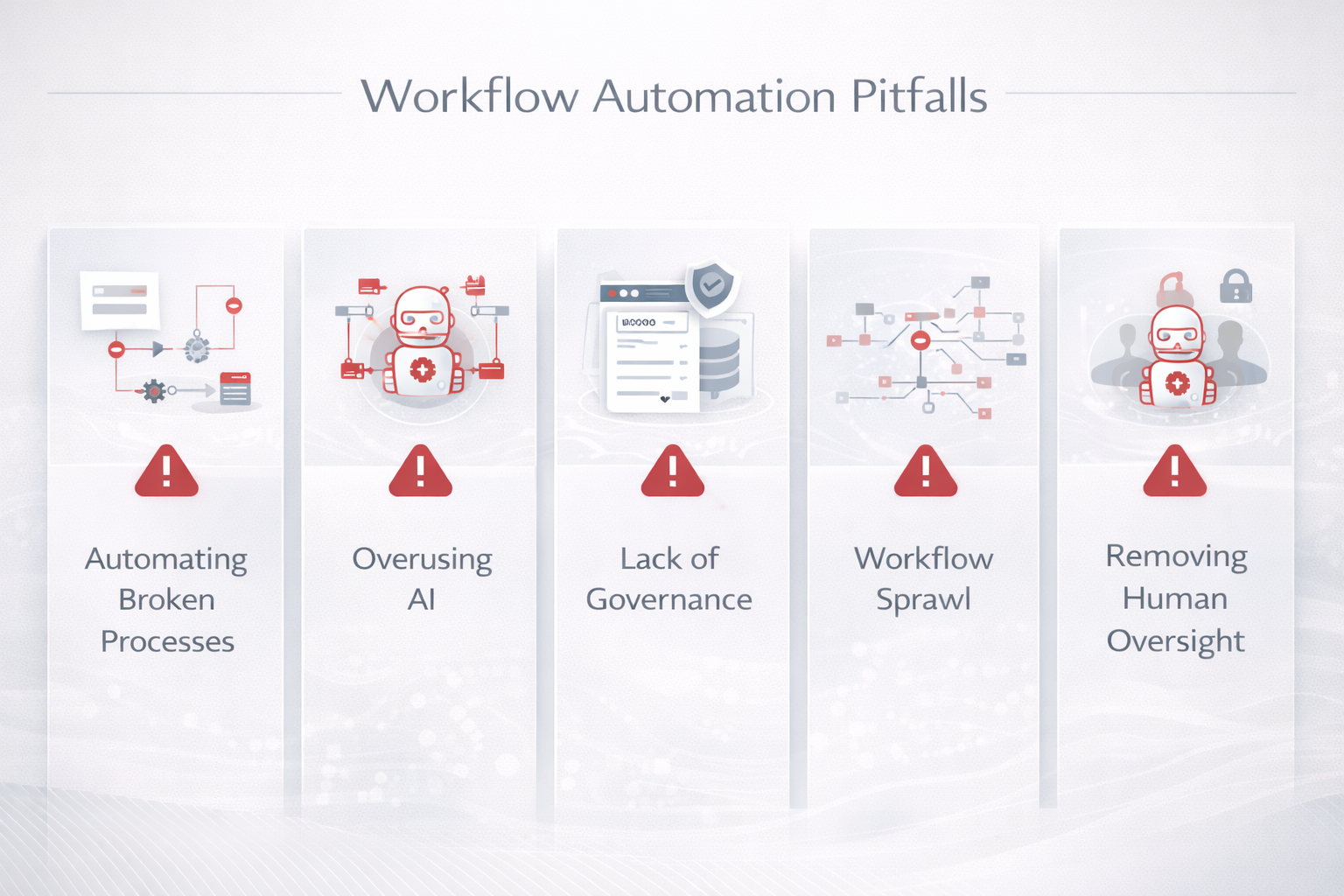
Common Automation Mistakes Businesses Make
Automation can create enormous value.
It can also create enormous complexity when implemented poorly.
The most successful organizations avoid several common mistakes.
Mistake #1: Automating Broken Processes
One of the most frequent mistakes is automating inefficient workflows.
Automation does not fix bad processes.
It accelerates them.
Before introducing automation, organizations should first improve the process itself.
Mistake #2: Using AI Where Rules Are Enough
Not every workflow requires AI.
Many operational processes are deterministic.
Examples:
- Data synchronization
- Notifications
- Approvals
- Record creation
Introducing AI unnecessarily increases complexity.
Use AI when judgment, interpretation, or contextual understanding is required.
Mistake #3: Ignoring Governance
As automation grows, governance becomes increasingly important.
Organizations need:
- Ownership
- Monitoring
- Documentation
- Security controls
- Audit visibility
Without governance, workflows become difficult to manage.
Mistake #4: Workflow Sprawl
Many businesses end up with hundreds of disconnected automations.
Over time, this creates:
- Operational confusion
- Maintenance issues
- Duplicate logic
- Reliability concerns
The solution is architectural thinking.
Workflows should be treated as operational systems rather than isolated automations.
Mistake #5: Removing Humans Completely
Many organizations become overly enthusiastic about full automation.
In practice, some workflows require human oversight.
Examples include:
- Financial decisions
- Compliance reviews
- Customer escalations
- Strategic approvals
The most effective systems often combine:
- Automation
- AI
- Human judgment
Rather than replacing one with another.
Building an Automation-First Organization
The most advanced organizations today are not simply adopting automation tools.
They are redesigning operations around automation.
This mindset shift changes everything.
Automation-first organizations typically:
- Design workflows before selecting tools
- Treat workflows as operational infrastructure
- Use AI selectively and strategically
- Prioritize visibility and governance
- Build systems rather than isolated automations
As a result, they achieve:
- Faster execution
- Better operational visibility
- Lower coordination overhead
- More consistent processes
- Greater scalability
Automation becomes a competitive advantage.
Not merely a productivity enhancement.
The Future of Workflow Automation
The next phase of workflow automation will be significantly different from what most organizations experience today.
Instead of workflows simply moving information, workflows will increasingly:
- Interpret information
- Make recommendations
- Coordinate activities
- Generate insights
- Trigger autonomous actions
This evolution will be driven by:
- AI agents
- Operational copilots
- Workflow orchestration platforms
- Knowledge systems
- Business intelligence layers
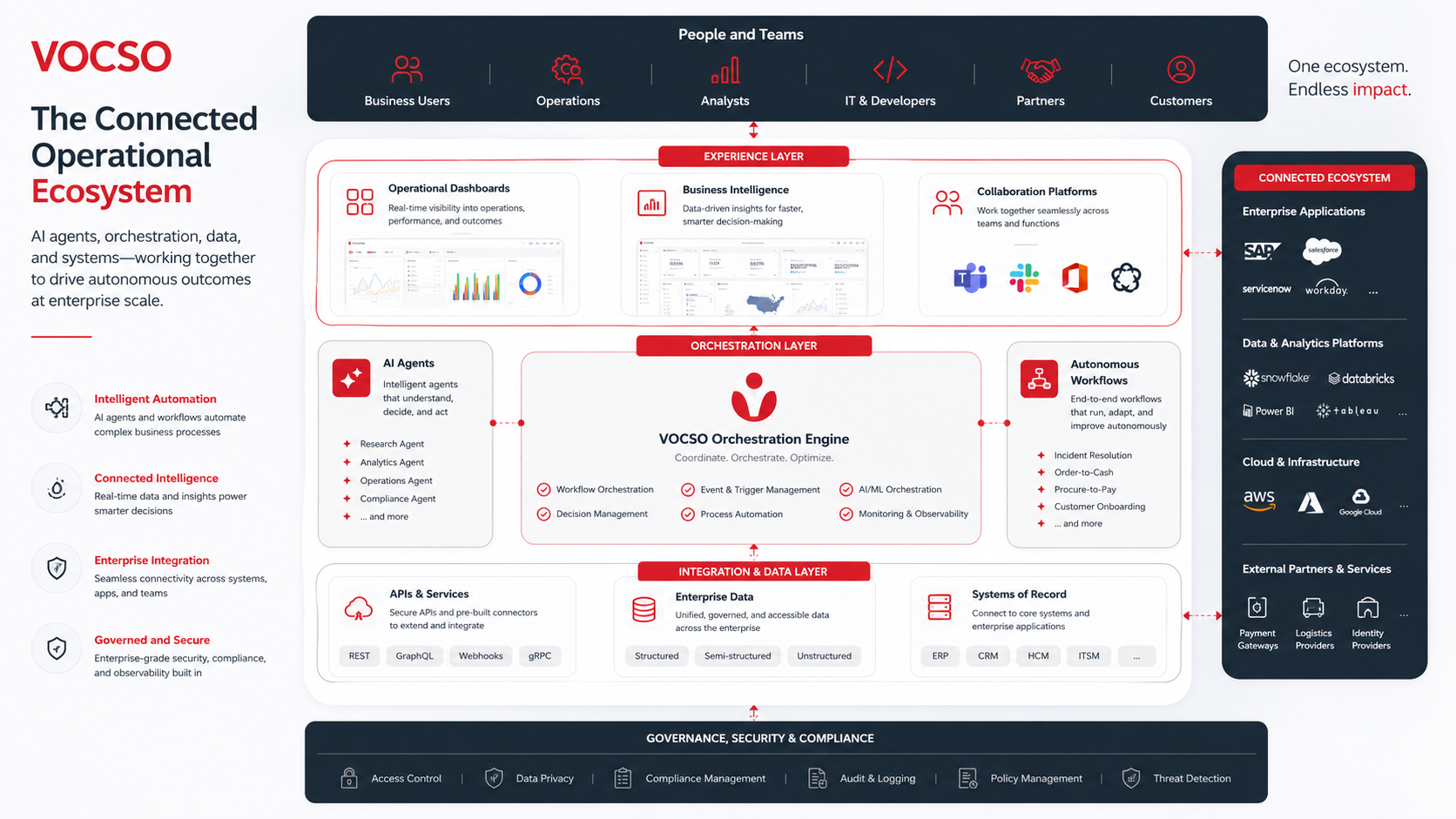
Organizations will increasingly build operational systems where:
- AI assists employees
- Workflows coordinate execution
- Dashboards provide visibility
- Agents handle repetitive analysis
- Humans focus on higher-value decisions
Final Thoughts
The future of workflow automation is not about connecting applications.
It’s about building operational systems.
The organizations creating the greatest value from automation are not necessarily using the most tools.
They are using the right tools in the right architecture.
Platforms such as:
- n8n
- Make
- Zapier
- Pipedream
- Workato
are increasingly becoming operational infrastructure rather than simple automation utilities.
Combined with AI systems, orchestration layers, internal tooling platforms, and operational databases, they enable businesses to operate with greater speed, visibility, and intelligence.
The most successful organizations will be those that move beyond task automation and begin thinking in terms of operational automation.
Because in the coming years, competitive advantage will increasingly come from how effectively systems coordinate work—not just how efficiently people perform it.
Need Help Designing AI-Powered Operational Workflows?
Whether you’re building:
- AI-enabled internal operations
- Workflow automation systems
- Operational dashboards
- Approval workflows
- AI agents
- Internal tools
- Reporting automation
- End-to-end orchestration platforms
VOCSO helps organizations design, build, and integrate modern operational systems that combine workflow automation, AI, internal tooling, and scalable business processes.
The goal isn’t simply to automate tasks.
It’s to build operational infrastructure that enables teams to move faster, operate smarter, and scale more effectively.














Leave a Reply